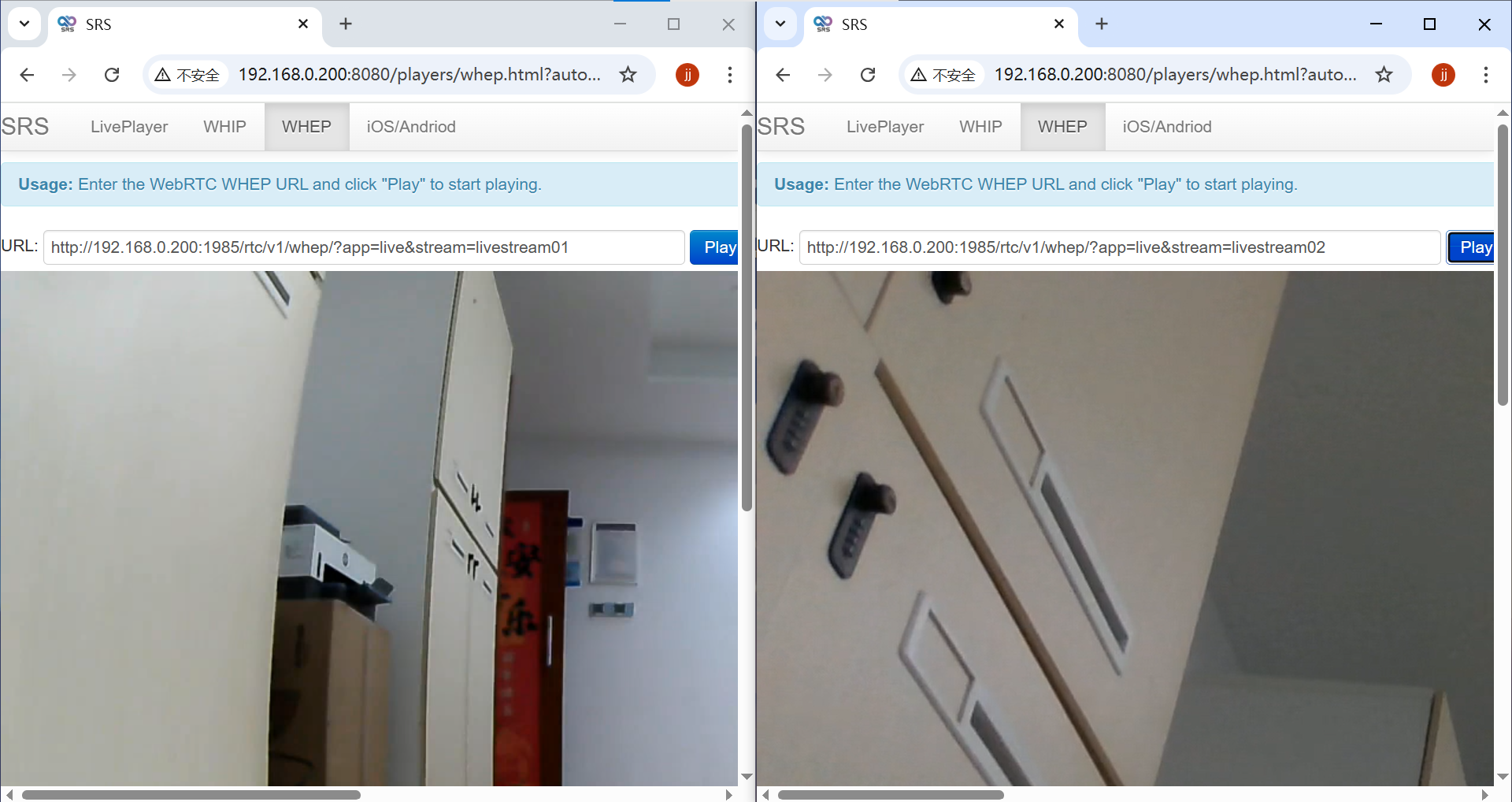
Introduction
Task
最近在玩宇树机器狗时,需要解决接入局域网内的设备都能够访问到机器狗的相机画面,机器狗扩展坞(外部加装)使用的是jetson orin NX作为开发板,机器狗自带了两个相机(机器狗前方的摄像头和扩展坞上的intel D435i RGB相机)。其他的结构配置如下图。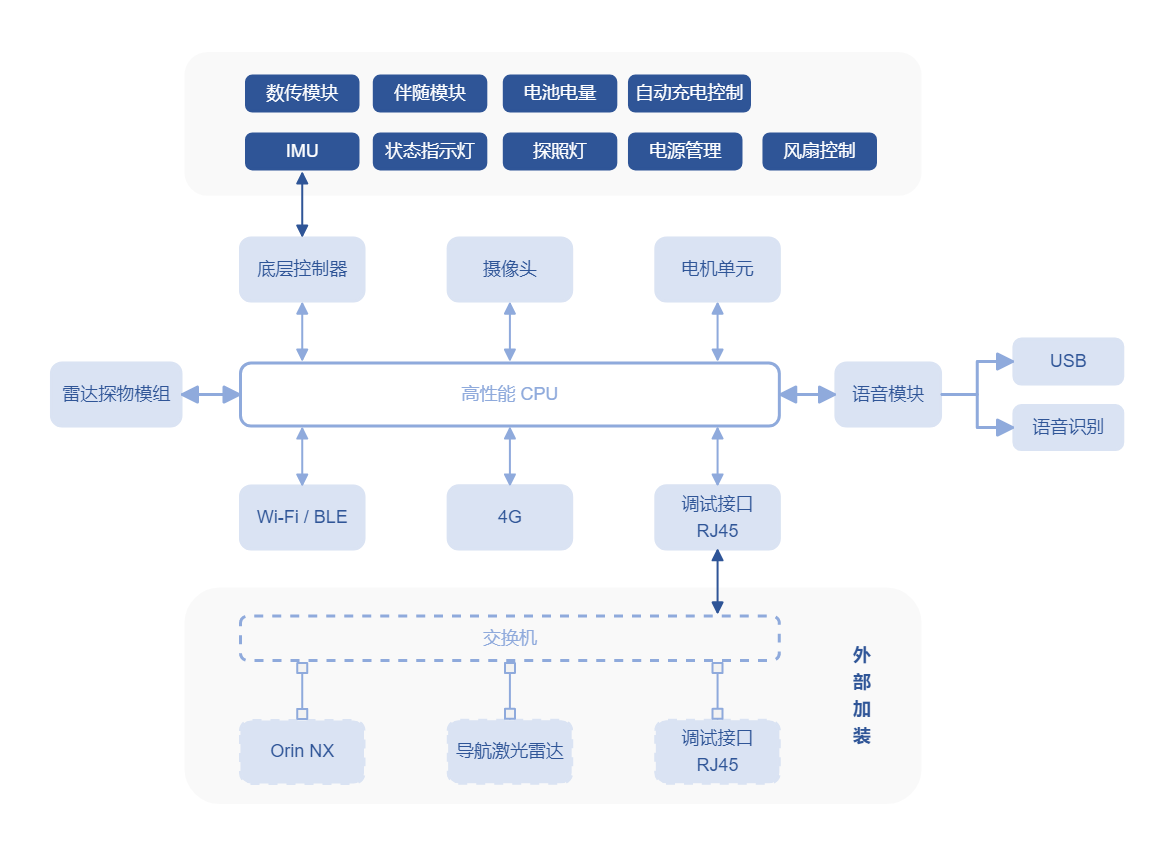
Camera Enable && Code
搭载的jetson Orin NX预装了ubuntu20.04版本,想要实现视频推流需要装ffmpeg包
1
2
| sudo apt-get upgrade
sudo apt-get install ffmpeg
|
Camera01
其中狗自带的摄像头与高性能CPU相连,底层CPU模块通过交换机与orin NX通信,指定网口为eth0,相机分辨率为1280*720,帧率为15 FPS,下面的代码为将摄像头数据推送到本地或局域网内指定ip(示例IP为:192.168.0.199)
1
2
3
4
5
6
7
8
9
10
11
12
13
14
15
16
17
18
19
20
21
22
23
24
25
26
27
28
29
30
31
32
33
34
35
36
37
38
39
40
41
42
43
44
45
46
47
48
49
50
51
52
53
54
55
56
57
58
59
60
61
62
63
64
65
66
67
68
69
70
71
72
73
74
75
76
77
78
79
80
81
82
83
84
85
86
87
88
89
90
91
92
93
94
95
96
97
98
99
100
101
102
103
104
105
106
107
108
109
110
111
112
113
114
115
116
117
118
119
120
121
122
123
124
125
126
127
128
129
130
131
132
133
134
135
136
137
138
139
140
141
142
143
144
145
146
147
148
149
150
151
152
153
154
155
156
157
158
159
160
161
162
163
164
165
166
167
168
169
170
171
172
173
174
|
#include <iostream>
#include <csignal>
#include <opencv4/opencv2/opencv.hpp>
#include <sstream>
#include <thread>
#include <chrono>
bool is_running = true;
void OnSignal(int) {
is_running = false;
}
bool checkRTMPServer(const std::string& server_ip, int port) {
std::stringstream test_cmd;
test_cmd << "timeout 5 nc -z " << server_ip << " " << port << " > /dev/null 2>&1";
int result = system(test_cmd.str().c_str());
return result == 0;
}
int main() {
signal(SIGINT, OnSignal);
signal(SIGQUIT, OnSignal);
signal(SIGTERM, OnSignal);
cv::VideoCapture cap("udpsrc address=230.1.1.1 port=1720 multicast-iface=eth0 ! application/x-rtp, media=video, encoding-name=H264 ! rtph264depay ! h264parse ! avdec_h264 ! videoconvert ! video/x-raw,width=1280,height=720,format=BGR ! appsink drop=1", cv::CAP_GSTREAMER);
if (!cap.isOpened()) {
std::cerr << "Failed to open camera." << std::endl;
return EXIT_FAILURE;
}
cap.set(cv::CAP_PROP_FRAME_WIDTH, 1280);
cap.set(cv::CAP_PROP_FRAME_HEIGHT, 720);
std::string rtmp_server_ip = "192.168.0.199";
int rtmp_port = 1935;
std::string rtmp_output_url = "rtmp://" + rtmp_server_ip + ":" + std::to_string(rtmp_port) + "/live/livestream01";
std::cout << "检查RTMP服务器连接状态..." << std::endl;
if (!checkRTMPServer(rtmp_server_ip, rtmp_port)) {
std::cerr << "错误:无法连接到RTMP服务器 " << rtmp_server_ip << ":" << rtmp_port << std::endl;
std::cerr << "请检查:" << std::endl;
std::cerr << "1. RTMP服务器是否正在运行" << std::endl;
std::cerr << "2. 防火墙是否阻止了连接" << std::endl;
std::cerr << "3. 网络连接是否正常" << std::endl;
std::cerr << "4. 服务器地址和端口是否正确" << std::endl;
cap.release();
return EXIT_FAILURE;
}
std::cout << "RTMP服务器连接正常" << std::endl;
std::stringstream command;
command << "ffmpeg ";
command << "-y "
<< "-loglevel error "
<< "-an "
<< "-f rawvideo "
<< "-vcodec rawvideo "
<< "-pix_fmt bgr24 "
<< "-s 1280x720 "
<< "-r 15 "
<< "-re ";
command << "-i - ";
command << "-c:v h264 "
<< "-pix_fmt yuv420p "
<< "-preset ultrafast "
<< "-tune zerolatency "
<< "-maxrate 50M "
<< "-bufsize 1k "
<< "-max_delay 100 "
<< "-g 3 "
<< "-f flv "
<< "-rtmp_live 1 "
<< "-rtmp_conn \"S:publish\" "
<< rtmp_output_url;
cv::Mat frame;
FILE *fp = nullptr;
int retry_count = 0;
const int max_retries = 3;
std::cout << "尝试连接到RTMP服务器: " << rtmp_output_url << std::endl;
while (retry_count < max_retries && is_running) {
if (!checkRTMPServer(rtmp_server_ip, rtmp_port)) {
std::cerr << "RTMP服务器连接丢失,正在重试..." << std::endl;
std::this_thread::sleep_for(std::chrono::seconds(3));
retry_count++;
continue;
}
fp = popen(command.str().c_str(), "w");
if (fp != nullptr) {
std::cout << "成功连接到RTMP服务器,开始推流..." << std::endl;
break;
} else {
retry_count++;
std::cerr << "连接失败,第 " << retry_count << " 次重试..." << std::endl;
std::this_thread::sleep_for(std::chrono::seconds(3));
}
}
if (fp != nullptr) {
int consecutive_errors = 0;
const int max_consecutive_errors = 10;
while (is_running && consecutive_errors < max_consecutive_errors) {
cap >> frame;
if (frame.empty()) {
std::cerr << "获取到空帧,跳过..." << std::endl;
consecutive_errors++;
std::this_thread::sleep_for(std::chrono::milliseconds(100));
continue;
}
size_t expected_size = frame.total() * frame.elemSize();
size_t written = fwrite(frame.data, sizeof(char), expected_size, fp);
if (written != expected_size) {
consecutive_errors++;
std::cerr << "写入数据失败 (" << consecutive_errors << "/" << max_consecutive_errors << "),可能连接中断" << std::endl;
if (ferror(fp)) {
std::cerr << "管道错误,推流连接已中断" << std::endl;
break;
}
} else {
consecutive_errors = 0;
}
std::this_thread::sleep_for(std::chrono::milliseconds(33));
}
pclose(fp);
cap.release();
if (consecutive_errors >= max_consecutive_errors) {
std::cout << "推流因连续错误而结束" << std::endl;
} else {
std::cout << "推流正常结束" << std::endl;
}
return EXIT_SUCCESS;
} else {
std::cerr << "无法连接到RTMP服务器,请检查:" << std::endl;
std::cerr << "1. RTMP服务器是否正在运行 (如: nginx-rtmp, SRS等)" << std::endl;
std::cerr << "2. 服务器配置是否允许发布流" << std::endl;
std::cerr << "3. 防火墙设置是否阻止连接" << std::endl;
std::cerr << "4. FFmpeg是否正确安装并支持RTMP" << std::endl;
std::cerr << "5. 网络延迟或带宽是否足够" << std::endl;
cap.release();
return EXIT_FAILURE;
}
}
|
Camera02
第二个相机是intel D435i,该相机一共有四个设备,包括两个红外相机、一个红外发射器和一个RGB相机。我们主要使用RGB相机,最高支持1920*1080分辨率,帧率支持15 FPS、30 FPS、60 FPS。查看相机设备时发现有六个(不清楚原因):
/dev/video0、/dev/video1、/dev/video2、/dev/video3、/dev/video4、/dev/video5
RGB相机是/dev/video4,可以使用下面命令直接检查相机画面:
code:
1
2
3
4
5
6
7
8
9
10
11
12
13
14
15
16
17
18
19
20
21
22
23
24
25
26
27
28
29
30
31
32
33
34
35
36
37
38
39
40
41
42
43
44
45
46
47
48
49
50
51
52
53
54
55
56
57
58
59
60
61
62
63
64
65
66
67
68
69
70
71
72
73
74
75
76
77
78
79
80
81
82
83
84
85
86
87
88
89
90
91
92
93
94
95
96
97
98
99
100
101
102
103
104
105
106
107
108
109
110
111
112
113
114
115
116
117
118
119
120
121
122
123
124
125
126
127
128
129
130
131
132
133
134
135
136
137
138
139
140
141
142
143
144
145
146
147
148
149
150
151
152
153
154
155
156
157
158
159
160
161
162
163
164
165
166
167
168
169
170
171
172
173
174
175
176
177
178
179
180
181
182
183
184
185
186
187
188
|
#include <iostream>
#include <csignal>
#include <opencv4/opencv2/opencv.hpp>
#include <sstream>
#include <thread>
#include <chrono>
bool is_running = true;
void OnSignal(int) {
is_running = false;
}
bool checkRTMPServer(const std::string& server_ip, int port) {
std::stringstream test_cmd;
test_cmd << "timeout 5 nc -z " << server_ip << " " << port << " > /dev/null 2>&1";
int result = system(test_cmd.str().c_str());
return result == 0;
}
int main() {
signal(SIGINT, OnSignal);
signal(SIGQUIT, OnSignal);
signal(SIGTERM, OnSignal);
cv::VideoCapture cap(4);
if (!cap.isOpened()) {
std::cerr << "Failed to open camera device video4." << std::endl;
std::cerr << "无法打开video4设备" << std::endl;
return EXIT_FAILURE;
} else {
std::cout << "成功打开video4摄像头设备" << std::endl;
}
cap.set(cv::CAP_PROP_FRAME_WIDTH, 1920);
cap.set(cv::CAP_PROP_FRAME_HEIGHT, 1080);
cap.set(cv::CAP_PROP_FPS, 30);
int actual_width = cap.get(cv::CAP_PROP_FRAME_WIDTH);
int actual_height = cap.get(cv::CAP_PROP_FRAME_HEIGHT);
double actual_fps = cap.get(cv::CAP_PROP_FPS);
std::cout << "摄像头分辨率: " << actual_width << "x" << actual_height << std::endl;
std::cout << "摄像头帧率: " << actual_fps << " fps" << std::endl;
std::string rtmp_server_ip = "192.168.0.199";
int rtmp_port = 1935;
std::string rtmp_output_url = "rtmp://" + rtmp_server_ip + ":" + std::to_string(rtmp_port) + "/live/livestream02";
std::cout << "检查RTMP服务器连接状态..." << std::endl;
if (!checkRTMPServer(rtmp_server_ip, rtmp_port)) {
std::cerr << "错误:无法连接到RTMP服务器 " << rtmp_server_ip << ":" << rtmp_port << std::endl;
std::cerr << "请检查:" << std::endl;
std::cerr << "1. RTMP服务器是否正在运行" << std::endl;
std::cerr << "2. 防火墙是否阻止了连接" << std::endl;
std::cerr << "3. 网络连接是否正常" << std::endl;
std::cerr << "4. 服务器地址和端口是否正确" << std::endl;
cap.release();
return EXIT_FAILURE;
}
std::cout << "RTMP服务器连接正常" << std::endl;
std::stringstream command;
command << "ffmpeg ";
command << "-y "
<< "-loglevel error "
<< "-an "
<< "-f rawvideo "
<< "-vcodec rawvideo "
<< "-pix_fmt bgr24 "
<< "-s " << actual_width << "x" << actual_height << " "
<< "-r 30 ";
command << "-i - ";
command << "-c:v libx264 "
<< "-pix_fmt yuv420p "
<< "-preset fast "
<< "-tune zerolatency "
<< "-b:v 6000k "
<< "-maxrate 8000k "
<< "-bufsize 2000k "
<< "-g 60 "
<< "-keyint_min 30 "
<< "-sc_threshold 0 "
<< "-profile:v high "
<< "-level 4.1 "
<< "-f flv "
<< "-rtmp_live 1 "
<< rtmp_output_url;
cv::Mat frame;
FILE *fp = nullptr;
int retry_count = 0;
const int max_retries = 3;
std::cout << "尝试连接到RTMP服务器: " << rtmp_output_url << std::endl;
while (retry_count < max_retries && is_running) {
if (!checkRTMPServer(rtmp_server_ip, rtmp_port)) {
std::cerr << "RTMP服务器连接丢失,正在重试..." << std::endl;
std::this_thread::sleep_for(std::chrono::seconds(3));
retry_count++;
continue;
}
fp = popen(command.str().c_str(), "w");
if (fp != nullptr) {
std::cout << "成功连接到RTMP服务器,开始推流..." << std::endl;
break;
} else {
retry_count++;
std::cerr << "连接失败,第 " << retry_count << " 次重试..." << std::endl;
std::this_thread::sleep_for(std::chrono::seconds(3));
}
}
if (fp != nullptr) {
int consecutive_errors = 0;
const int max_consecutive_errors = 10;
while (is_running && consecutive_errors < max_consecutive_errors) {
cap >> frame;
if (frame.empty()) {
std::cerr << "获取到空帧,跳过..." << std::endl;
consecutive_errors++;
std::this_thread::sleep_for(std::chrono::milliseconds(100));
continue;
}
size_t expected_size = frame.total() * frame.elemSize();
size_t written = fwrite(frame.data, sizeof(char), expected_size, fp);
if (written != expected_size) {
consecutive_errors++;
std::cerr << "写入数据失败 (" << consecutive_errors << "/" << max_consecutive_errors << "),可能连接中断" << std::endl;
if (ferror(fp)) {
std::cerr << "管道错误,推流连接已中断" << std::endl;
break;
}
} else {
consecutive_errors = 0;
}
std::this_thread::sleep_for(std::chrono::milliseconds(33));
}
pclose(fp);
cap.release();
if (consecutive_errors >= max_consecutive_errors) {
std::cout << "推流因连续错误而结束" << std::endl;
} else {
std::cout << "推流正常结束" << std::endl;
}
return EXIT_SUCCESS;
} else {
std::cerr << "无法连接到RTMP服务器,请检查:" << std::endl;
std::cerr << "1. RTMP服务器是否正在运行 (如: nginx-rtmp, SRS等)" << std::endl;
std::cerr << "2. 服务器配置是否允许发布流" << std::endl;
std::cerr << "3. 防火墙设置是否阻止连接" << std::endl;
std::cerr << "4. FFmpeg是否正确安装并支持RTMP" << std::endl;
std::cerr << "5. 网络延迟或带宽是否足够" << std::endl;
cap.release();
return EXIT_FAILURE;
}
}
|
SRS服务搭建与推流
SRS简介
一款开源的实时视频流媒体服务器,主要用于实时音视频流的推送、转发、直播、点播等应用场景。它支持RTMP、RTSP、HLS、HTTP-FLV、WebRTC等多种流媒体协议。Windows端安装链接:https://github.com/ossrs/srs,找到release下载最新版。
使用
安装完成后使用管理员权限打开终端,
启动SRS:
1
| D:\software\SRS>.\objs\srs.exe -c .\conf\console.conf
|
也可以直接通过绝对路径执行,但不要进入到objs目录再使用.\srs.exe -c ..\conf\console.conf跑,会导致Not found。
浏览器打开http://192.168.0.199:8080/可以查看服务是否跑起来了,界面如下所示:
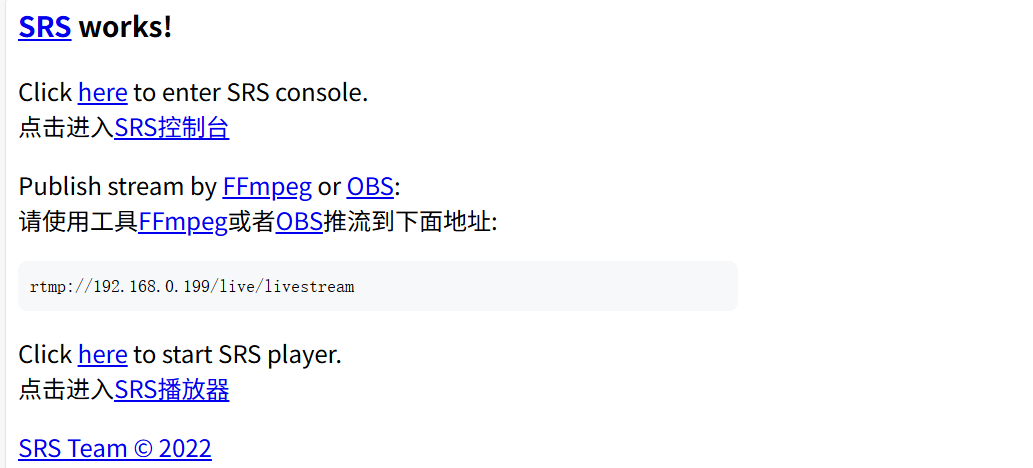
在srs服务跑起来后执行Camera01和Camera02中的代码,注意Camera01中的推流链接为rtmp://192.168.0.199:1935/live/livestream01,Camera02中的推流链接为rtmp://192.168.0.199:1935/live/livestream02(这两个链接可以在代码中设置)。
其中的localhost换成跑srs设备的IP。